- Android Spinner allows you to select an item from a drop down menu list. It provides a quick way to select one value from a set.
- Android Spinner class is the subclass of AsbSpinner class.
- Android Spinner provides an easy way to select value from list.
- It shows its currently selected value with all other available values from which the user can select a new one.
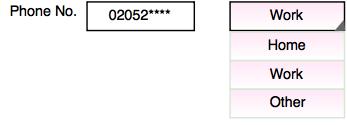
- In the above example, it displays a dropdown list which indicates the category of phone number. When user touches the spinner, it displays a dropdown menu with all other available values from which the user can selects one.
- This class is like the dropdown menu with multiple values from which the end user can select only one value.
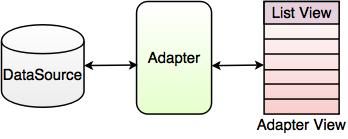
- In the above figure, an Adapter works as a bridge between DataSource (Array, ArrayList etc.) and AdapterView. Some of the important objects of AdapterView are Spinner, ListView and GridView.
- The user can add a spinner to his/her layout with the Spinner object.
- SpinnerAdapter is used to populate the spinner with a list of choices. The user then needs to specify this in his/her Activity or Fragment source code.
- The Spinner is associated with AdapterView. User needs to use one of the adapter classes with Spinner.
For example:
For example
<Spinner
android:id=”@+id/planets_spinner”
android:layout_width=“fill_parent”
android:layout_height=“wrap_content” />
Example
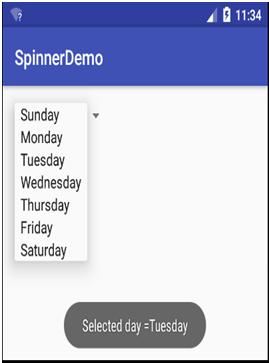
Following example demonstrates Spinner Class demo and displays the dropdown list of days.
File Name: strings.xml
<resources>
<string name = "app_name">SpinnerDemo</string>
<string name = "action_settings">Settings</string>
<string-array name = "Days">
<item>Sunday</item>
<item>Monday</item>
<item>Tuesday</item>
<item>Wednesday</item>
<item>Thursday</item>
<item>Friday</item>
<item>Saturday</item>
</string-array>
</resources>
File Name: content_main.xml
<?xml version = "1.0" encoding = "utf-8"?>
<RelativeLayoutxmlns:android="http://schemas.android.com/apk/res/android"
xmlns:app = "http://schemas.android.com/apk/res-auto"
xmlns:tools = "http://schemas.android.com/tools"
android:layout_width = "match_parent"
android:layout_height = "match_parent"
android:paddingBottom = "@dimen/activity_vertical_margin"
android:paddingLeft = "@dimen/activity_horizontal_margin"
android:paddingRight = "@dimen/activity_horizontal_margin"
android:paddingTop = "@dimen/activity_vertical_margin"
app:layout_behavior = "@string/appbar_scrolling_view_behavior"
tools:context = "com.example.custom.spinnerdemo.MainActivity"
tools:showIn = "@layout/activity_main">
<Spinner
android:layout_width = "wrap_content"
android:layout_height = "wrap_content"
android:id = "@+id/spinner"
android:layout_alignParentTop = "true"
android:layout_alignParentLeft = "true"
android:layout_alignParentStart = "true" />
</RelativeLayout>
File Name: MainActivity.java
public class MainActivity extends AppCompatActivity
{
Spinner spinner;
@Override
protected void onCreate(Bundle savedInstanceState)
{
super.onCreate(savedInstanceState);
setContentView(R.layout.activity_main);
Toolbar toolbar = (Toolbar) findViewById(R.id.toolbar);
setSupportActionBar(toolbar);
spinner = (Spinner) findViewById(R.id.spinner);
ArrayAdapter adapter = ArrayAdapter.createFromResource(this,
R.array.Days, android.R.layout.simple_spinner_item);
spinner.setAdapter(adapter);
spinner.setOnItemSelectedListener(new AdapterView.OnItemSelectedListener()
{
@Override
public void onItemSelected (AdapterView parent, View view, intposition, long id)
{
TextView txt = (TextView)view;
Toast toast = Toast.makeText(getApplicationContext(), "Selected day ="+txt.getText(), Toast.LENGTH_LONG);
toast.setGravity(Gravity.CENTER,0,0);
toast.show();
}
@Override
public void onNothingSelected (AdapterView parent)
{
}
});
}
}
Output: