In AngularJS you can create your own directive(Custom directive) according to your need. Please keep in mind that directive method returns the javascript object.
New directives are created by using the .directive function as.
var myApp = angular.module("mymodule", [ ]);
myApp.directive("custDirective", function () { })
Here, the directive name is ‘custDirective’.
By using Custom directives in AngularJS you can extend the functionality of HTML.
AngularJS provides support to create custom directives for following type of elements.
- Element name
- Attribute
- Class
- Comment
If you have declared your custom directive name according to camel case naming convention, then on the view you can call it in different ways. On the view directive they can be used by separating the camel case name either by using dash, colon, or underscore. You can also use combination of dash, underscore or colon. Suppose that your directive name is myCustomDirective, then you can call it on the view either of the following ways:
1. my-custom-directive
2. my : custom : directive
3. my_custom_directive
4. my-custom : directive
Properties of directive.
- restrict
- scope
- template
- templateUrl
- controller
- link
The restrict values are:
- E for Element name
- A for Attribute
- C for Class
- M for Comment
Code for Script.js
/// <reference path="angular.js" />
var myApp = angular.module("myModule", []);
var myController = function ($scope)
{
$scope.Employee = {name:"Raj",Age:25,Gender:"Male"}
};
myApp.directive('myCustomDirective', function ()
{
return
{
restrict: "E",
template: "<b>Welcome at careerRide</b></br>"
}
})
myApp.directive('employeeDirective', function ()
{
return
{
restrict: "E", /* restrict this directive to element */
template: "<b>Name={{Employee.name}}</br>
Age={{Employee.Age}}</br>
Gender={{Employee.Gender}}</b>"
}
})
myApp.controller("myCont", myController);
When you call directive function, you can register a new directive. The first parameter to the directive() function is the name of the directive to register.If you want to activate the directivein your HTML templates, then you have to use this name. The second parameter passed to the directive function is an anonymous function.The JavaScript object returned from the function has two properties: A restrict field and a templatefield.
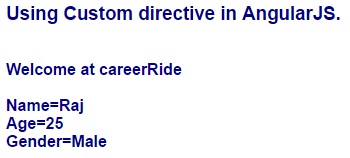
In Script.js file we have created two directives. The first directive 'myCustomDirective' simply prints the message and second directive 'employeeDirective' prints the employee information. Restrict=“E” property restricts this directive to only elements.
You can use these directives in html file same as normal HTML tag.
Code for Demo.html
<!DOCTYPE html>
<html ng-app="myModule">
<head>
<script src="Scripts/angular.js">
</script>
<script src="Scripts/Script.js">
</script>
</head>
<body style="font-family:Arial; font-size:medium; color:darkblue">
<div ng-controller="myCont">
<h3>Using Custom directive in AngularJS.</h3>
<br/>
<my-custom-directive></my-custom-directive>
<employee-directive></employee-directive>
</div>
</body>
</html>
Execute the Demo.html file you will get the following result.
Output: