ng-repeat directive
- ng-repeat is similar to foreach loop in C# or in JAVA.
- Let’s take an example to understand the working of ng-repeat directive.
- Suppose that we have an array of employee and want to show the employee data in a tabular form.
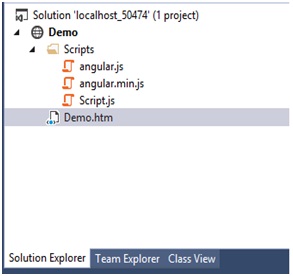
Example: Show the employee data in tabular form from an array
File Name: Script.js in Scripts folder.
/// <reference path="angular.min.js" />
var myApp = angular.module("myModule", []);
var myController = function ($scope)
{
var Employee = [
{
FirstName: "Raj",
LastName: "Parihar",
Gender: "Male",
Address: "Pune",
Salary: "Rs. 40000",
Company: "careerRide.com"
},
{
FirstName: "Shiva",
LastName: "Parihar",
Gender: "Male",
Address: "Pune",
Salary: "Rs. 50000",
Company: "Tech.com"
},
{
FirstName: "Mili",
LastName: "Zen",
Gender: "Female",
Address: "US",
Salary: "Rs. 40000",
Company: "IBM"
},
{
FirstName: "Divya",
LastName: "Singh",
Gender: "Female",
Address: "Nagpur",
Salary: "Rs. 40000",
Company: "Infosys"
},
{
FirstName: "Digvijay",
LastName: "Chauhan",
Gender: "Male",
Address: "Pune",
Salary: "Rs. 140000",
Company: "careerRide.com"
}
];
$scope.Emp = Employee;
};
myApp.controller("myCont", myController);
Code for Demo.htm file.
<!DOCTYPE html>
<html ng-app="myModule">
<head>
<script src="Scripts/angular.min.js" type="text/javascript"></script>
<script src="Scripts/Script.js"></script>
<style>
table, th, td
{
border: 1px solid grey;
border-collapse: collapse;
padding: 5px;
}
table tr:nth-child(odd)
{
background-color: #ffe6e6;
}
table tr:nth-child(even)
{
background-color: #ccffcc;
}
</style>
</head>
<body>
<div ng-controller="myCont">
<table>
<tr>
<th>FirstName</th>
<th>LastName</th>
<th>Gender</th>
<th>Address</th>
<th>Salary</th>
<th>Company</th>
</tr>
<tr ng-repeat="e in Emp">
<td>{{e.FirstName}}</td>
<td>{{e.LastName}}</td>
<td>{{e.Gender}}</td>
<td>{{e.Address}}</td>
<td>{{e.Salary}}</td>
<td>{{e.Company}}</td>
</tr>
</table>
</div>
</body>
</html>
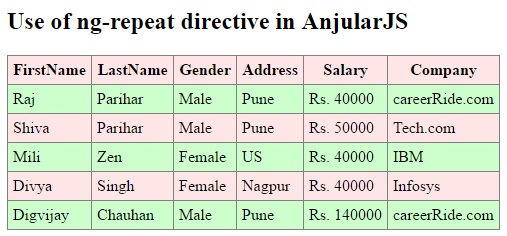
In this example we have created an array named Employee with six properties FirstName, LastName, Gender, Address, Salary, and Company. For displaying this array in tabular form ng-repeat directive is used. You can read (ng-repeat="e in Emp") as foreach e in Emp. Now you can display all employee properties in tabular form as given below.
Output:
Nesting of ng-repeat directive
Suppose that you need to show your data like the below given picture: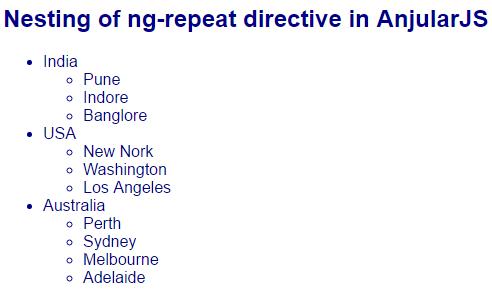
For displaying the data as above we need to define nested "ng-repeat" directive in angularjs. First we have to write nested <li> in HTML.
Example: Nesting of ng-repeat directive in AngularJS
File Name: Script.js in Scripts folder.
/// <reference path="angular.min.js" />
var myApp = angular.module("myModule", []);
var myController = function ($scope)
{
$scope.Countries = [
{
name: "India",
cities:[{name:"Pune"},
{name:"Indore"},
{name:"Banglore"}]
},
{
name: "USA",
cities: [{ name: "New Nork" },
{ name: "Washington" },
{ name: "Los Angeles" }]
},
{
name: "Australia",
cities: [{ name: "Perth" },
{ name: "Sydney" },
{ name: "Melbourne" },
{ name: "Adelaide" }]
},
];
};
myApp.controller("myCont", myController);
Code for Demo.htm file.
<!DOCTYPE html>
<html ng-app="myModule">
<head>
<scrip tsrc="Scripts/angular.min.js" type="text/javascript"></script>
<script src="Scripts/Script.js"></script>
</head>
<body style="font-family:Arial; font-size:medium; color:darkblue">
<div ng-controller="myCont">
<h2>Nesting of ng-repeat directive in AnjularJS</h2>
<ul>
<li ng-repeat="country in Countries">
{{country.name}}
<ul>
<li ng-repeat="city in country.cities">
{{city.name}}
</li>
</ul>
</li>
</ul>
</div>
</body>
</html>