Checkbox
A check box provides a control that is used to turn an option ON (true) or OFF (false). Clicking on a check box changes its state from ON to OFF or OFF to ON. Checkbox contains the associated label.Declaration of Checkbox Class
public class Checkbox
extends Component
implements ItemSelectable, Accessible
Checkbox Class Constructors
| Constructors | Description |
|---|---|
| Checkbox() | Checkbox with an empty string for its label. |
| Checkbox(String label) | Creates a checkbox with specified string label. |
| Checkbox(String label, boolean state) | Constructs a checkbox with the specified label and sets the specified state. |
| Checkbox(String label, boolean state, CheckboxGroup group) | Creates a checkbox with the specified label, with a set of specified state and in the specified checkbox group. |
Example : Ceateing checkbox using AWT
// CheckboxDemo.java
import java.awt.*;
import java.awt.event.*;
class CheckboxDemo extends Frame implements
ItemListener
{
String title;
TextField text;
Checkbox c1, c2, c3, c4;
public CheckboxDemo(String title)
{
super(title);
setLayout(new FlowLayout());
text = new TextField(20);
c1 = new Checkbox("Java");
c2 = new Checkbox("Oracle");
c3 = new Checkbox("MySQL");
c4 = new Checkbox("Python");
add(text);
add(c1);
add(c2);
add(c3);
add(c4);
c1.addItemListener(this);
c2.addItemListener(this);
c3.addItemListener(this);
c4.addItemListener(this);
}
public void itemStateChanged(ItemEvent e)
{
String msg = " ";
if(e.getSource() == c1)
{
text.setText(msg+"You have selected Java");
}
if(e.getSource() == c2)
{
text.setText(msg+"You have selected Oracle");
}
if(e.getSource() == c3)
{
text.setText(msg+"You have selected MySQL");
}
if(e.getSource() == c4)
{
text.setText(msg+"You have selected Python");
}
}
public static void main(String args[])
{
CheckboxDemo frame = new CheckboxDemo ("Surendra Frame");
frame.setSize(500, 200);
frame.setBackground(Color.PINK);
frame.setVisible(true);
}
}
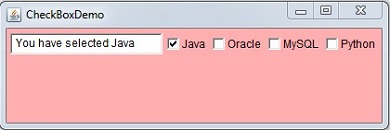
Output:
JCheckbox
It is also used to implement a check box to select or deselect an item. The JCheckbox provides the functionality of check box which is concrete implementation of AbstractButton.
Declaration of JCheckbox Class
public class JCheckbox
extends JToggleButton
implements Accessible
JCheckbox Constructors
| Constructors | Description |
|---|---|
| JCheckBox() | Creates an initially unselected checkbox button with no text and no icon. |
| JCheckBox(Action a) | Creates a check box where properties are taken from the action supplied. |
| JCheckBox(Icon icon) | Constructs an initially unselected check box with an icon. |
| JCheckBox(Icon icon, boolean state) | Constructs check box with icon and it specifies whether it was initially selected or not. |
| JCheckBox(String str) | Creates an initially unselected check box with text. |
| JCheckBox(String str, boolean state) | Creates the check box with text and it specifies whether it is initially selected or not. |
| JCheckBox(String str, Icon icon) | Creates an initially unselected check box with specified text and icon. |
| JCheckBox(String str, Icon icon, boolean state) | Create a check box with specified text and icon and specifies that whether it is initially selected or not. |
Example : To create checkbox in Java
// JCheckBoxDemo.java
import javax.swing.JCheckBox;
import javax.swing.JFrame;
public class JCheckBoxDemo
{
public static void main(String args[])
{
JFrame frame = new JFrame("JCheckBox Demo");
JCheckBox c1 = new JCheckBox("Apple");
frame.add(c1);
frame.setSize(200, 150);
frame.setDefaultCloseOperation(JFrame.EXIT_ON_CLOSE);
frame.setVisible(true);
}
}
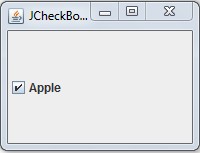
Output: