JComboBox
JComboBox is the combination of a text field and a drop down. The user can select a value from the drop-down list, which appears on the list. The combo box contains an editable field.Declaration of JComboBox Class
public class JComboBox<E>
extends JComponent
implements ItemSelectable, ActionListner Accessible
where,
E: the type of element of this combo box
JComboBox Class Constructors
| Constructor | Description |
|---|---|
| JComboBox() | Creates the JComboBox with default data model. |
| JComboBox(ComboBoxModel<E> model) | Creates a JComboBox that takes its items from an existing ComboBoxModel. |
| JComboBox(E[ ] items) | Creates a JComboBox that contains the elements in the specified array. |
| JComboBox(Vector<E> items) | Creates a JComboBox that contains the elements in the specified Vector. |
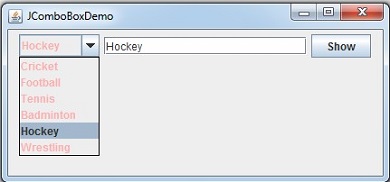
Example of using JComboBox, JTextField and JButton
// JComboDemo.java
import java.awt.Color;
import java.awt.event.*;
import javax.swing.*;
public class JComboDemo
{
public static void main(String args[])
{
final JComboBox combo;
final JTextField txt;
JButton b1 = new JButton("Show");
String sports[] = {"Cricket", "Football", "Tennis", "Badminton", "Hockey", "Wrestling"};
JFrame frame = new JFrame("JComboBoxDemo");
JPanel panel = new JPanel();
combo = new JComboBox(sports);
combo.setForeground(Color.pink);
txt = new JTextField(20);
panel.add(combo);
panel.add(txt);
panel.add(b1);
frame.add(panel);
combo.addItemListener(new ItemListener()
{
@Override
public void itemStateChanged(ItemEvent ie)
{
String str = (String)combo.getSelectedItem();
txt.setText(str);
}
});
frame.setDefaultCloseOperation(JFrame.EXIT_ON_CLOSE);
frame.setSize(430, 200);
frame.setVisible(true);
}
}
Output: