Inheritance
- Inheritance can be defined as the process of acquiring the properties of parent’s class by child class.
- It provides the mechanism of code re-usability and represents IS-A relationship.
For example Bike is the super class (parent’s class) and Honda, Bajaj, TVS are the subclass (child class, derived class). Honda, Bajaj and TVS have the property of Bike class. - extends keyword is used for inheritance.
class Base
{
// code
}
class Derive extends Base
{
// code
}
Example: Sample program for inheritance
class SuperDemo
{
int result;
public void square(int a)
{
result = a * a;
System.out.println("The square of the "+a+" is: "+result);
}
}
public class SubDemo extends SuperDemo
{
public void cube(int a)
{
result = a * a * a;
System.out.println("The cube of the "+a+" is: "+result);
}
public static void main(String args[])
{
int a = 25;
SubDemo sub = new SubDemo();
sub.square(a);
sub.cube(a);
}
}
Output:
The square of the 25 is: 625
The cube of the 25 is: 15625
Types of inheritance
There are three types of inheritance in Java.1. Single level
2. Multilevel inheritance
3. Hierarchical
Single Level Inheritance
When a class extends only one class, then it is called single level inheritance.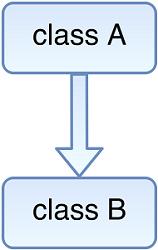
Fig: Single Level Inheritance
Syntax:
class A
{
//code
}
class B extends A
{
//code
}
Example: Sample program for single level inheritance
class Parent
{
public void m1()
{
System.out.println("Class Parent method");
}
}
public class Child extends Parent
{
public void m2()
{
System.out.println("Class Child method");
}
public static void main(String args[])
{
Child obj = new Child();
obj.m1();
obj.m2();
}
}
Output:
Class Parent method
Class Child method
Multilevel Inheritance
Multilevel inheritance is a mechanism where one class can be inherited from a derived class thereby making the derived class the base class for the new class.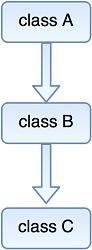
Fig: Multilevel Inheritance
Syntax:
class A
{
//code
}
class B extends A
{
//code
}
class C extends B
{
//code
}
Example: Sample program for multilevel inheritance
class Grand
{
public void m1()
{
System.out.println("Class Grand method");
}
}
class Parent extends Grand
{
public void m2()
{
System.out.println("Class Parent method");
}
}
class Child extends Parent
{
public void m3()
{
System.out.println("Class Child method");
}
public static void main(String args[])
{
Child obj = new Child();
obj.m1();
obj.m2();
obj.m3();
}
}
Output:
Class Grand method
Class Parent method
Class Child method
Hierarchical Inheritance
When one base class can be inherited by more than one class, then it is called hierarchical inheritance.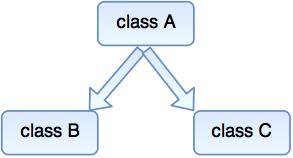
Fig: Hierarchical Inheritance
Syntax:
class A
{
// code
}
class B extends A
{
// code
}
class C extends A
{
//code
}
Example: Sample program for hierarchical inheritance
class A
{
public void m1()
{
System.out.println("method of Class A");
}
}
class B extends A
{
public void m2()
{
System.out.println("method of Class B");
}
}
class C extends A
{
public void m3()
{
System.out.println("method of Class C");
}
}
class D extends A
{
public void m4()
{
System.out.println("method of Class D");
}
}
public class MainClass
{
public void m5()
{
System.out.println("method of Class MainClass");
}
public static void main(String args[])
{
A obj1 = new A();
B obj2 = new B();
C obj3 = new C();
D obj4 = new D();
obj1.m1();
obj2.m1();
obj3.m1();
obj4.m1();
}
}
Output:
method of Class A
method of Class A
method of Class A
method of Class A
Multiple Inheritances
- In multiple inheritance, one derive class can extend more than one base class.
- Multiple inheritances are basically not supported by Java, because it increases the complexity of the code.
- But they can be achieved by using interfaces.
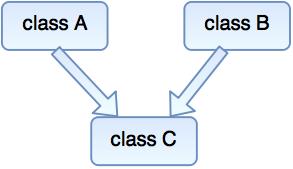
Fig: Multiple Inheritance
Example: Sample program for multiple inheritance
class X
{
void display()
{
System.out.println("class X dispaly method ");
}
}
class Y
{
void display()
{
System.out.println("class Y display method ");
}
}
public class Z extends X,Y
{
public static void main(String args[])
{
Z obj=new Z();
obj.display();
}
}
Output:
Compile time error
Access Modifiers
Access modifiers are simply a keyword in Java that provides accessibility of a class and its member. They set the access level to methods, variable, classes and constructors.
Types of access modifier
There are 4 types of access modifiers available in Java.- public
- default
- protected
- private
public
The member with public modifiers can be accessed by any classes. The public methods, variables or class have the widest scope.Example: Sample program for public access modifier
public static void main(String args[])
{
// code
}
default
When we do not mention any access modifier, it is treated as default. It is accessible only within same package.Example: Sample program for default access modifier
int a = 25;
String str = "Java";
boolean m1()
{
return true;
}
protected
The protected modifier is used within same package. It lies between public and default access modifier. It can be accessed outside the package but through inheritance only.A class cannot be protected.
Example: Sample program for protected access modifier
class Employee
{
protected int id = 101;
protected String name = "Jack";
}
public class ProtectedDemo extends Employee
{
private String dept = "Networking";
public void display()
{
System.out.println("Employee Id : "+id);
System.out.println("Employee name : "+name);
System.out.println("Employee Department : "+dept);
}
public static void main(String args[])
{
ProtectedDemo pd = new ProtectedDemo();
pd.display();
}
}
Output:
Employee Id : 101
Employee name : Jack
Employee Department : Networking
private
The private methods, variables and constructor are not accessible to any other class. It is the most restrictive access modifier. A class except a nested class cannot be private.Example: Sample program for private access modifier
public class PrivateDemo
{
private int a = 101;
private String s = "TutorialRide";
public void show()
{
System.out.println("Private int a = "+a+"\nString s = "+s);
}
public static void main(String args[])
{
PrivateDemo pd = new PrivateDemo();
pd.show();
System.out.println(pd.a+" "+pd.s);
}
}
Output:
Private int a = 101
String s = TutorialRide
101 TutorialRide
Table for Access Modifier
| Access modifier | In class | In package | Outside package by subclass | Outside package |
|---|---|---|---|---|
| public | Yes | Yes | Yes | No |
| protected | Yes | Yes | Yes | No |
| default | Yes | Yes | No | No |
| private | Yes | No | No | No |
The super keyword in Java
- super keyword is similar to this keyword in Java.
- It is used to refer to the immediate parent class of the object.
- super () calls the parent class constructor with no argument.
- super.methodname calls method from parents class.
- It is used to call the parents class variable.
Example: Sample program for invoking parents class constructor
class Animal
{
public Animal(String str)
{
System.out.println("Constructor of Animal: " + str);
}
}
class Lion extends Animal
{
public Lion()
{
super("super call Lion constructor");
System.out.println("Constructer of Lion.");
}
}
public class Test
{
public static void main(String[] a)
{
Lion lion = new Lion();
}
}
Output:
Constructor of Animal: super call from Lion constructor
Constructor of Lion.
Example: Sample program for calling parents class variable
class Base
{
int a = 50;
}
public class Derive extends Base
{
int a = 100;
void display()
{
System.out.println(super.a);
System.out.println(a);
}
public static void main(String[] args)
{
Derive derive = new Derive();
derive.display();
}
}
Output:
50
100
The final keyword in Java
The final keyword in Java indicates that no further modification is possible. Final can be Variable, Method or Class
Final Variable
Final variable is a constant. We cannot change the value of final variable after initialization.Example: Sample program for final keyword in Java
class FinalVarDemo
{
final int a = 10;
void show()
{
a = 20;
System.out.println("a : "+a);
}
public static void main(String args[])
{
FinalVarDemo var = new FinalVarDemo();
var.show();
}
}
Output:
Compile time error
Final method
When we declare any method as final, it cannot be override.Example: Sample program for final method in Java
class Animal
{
final void eat()
{
System.out.println("Animals are eating");
}
}
public class Dear extends Animal
{
void eat()
{
System.out.println("Dear is eating");
}
public static void main(String args[])
{
Dear dear = new Dear();
dear.eat();
}
}
Output:
Compile time error
Final Class
When a class is declared as a final, it cannot be extended.Example: Sample program for final class in Java
final class Animal
{
void eat()
{
System.out.println("Animals are eating");
}
}
class Dear extends Animal
{
void eat()
{
System.out.println("Dear is eating");
}
public static void main(String args[])
{
Dear dear = new Dear();
dear.eat();
}
}
Output:
Compile time error