- Value
- Reference
Exception: Always remember, the string data type, is a reference type not value type.
A value type contents are stored on the stack.
For example:
int intVar=50;
The value 50 is stored in an area of memory called the stack.
You will use the intVar variable in the function, when the control goes out of scope of the method, the value from the stack will be over.
Using the stack is efficient compare to heap, but it is problem if control goes out of scope. If you created reference type such as an instance of a class, then you can share data between different classes.
For more understanding of value types and reference types let us take example.
Example 1
int x = new int();
x = 120;
int y = new int();
y = x;
y = 130;
Console.WriteLine("x = " +x);
Console.ReadLine();
Output: x= 120
In the above example, value of variable y is changed. "x" has its original value and its location on stack is not affected . Therefore output is x= 120.
Example 2
class Numbers
{
public int intVar;
}
class Program
{
static void Main(string[] args)
{
Numbers obj1 = new Numbers();
obj1.intVar = 30;
Numbers obj2 = new Numbers();
obj2 = obj1;
obj2.intVar = 40;
Console.WriteLine("Value = "+obj1.intVar);
Console.ReadLine();
}
}
Output: Value = 40
In the above program, both variable x and y are pointing to the same location on the heap memory.
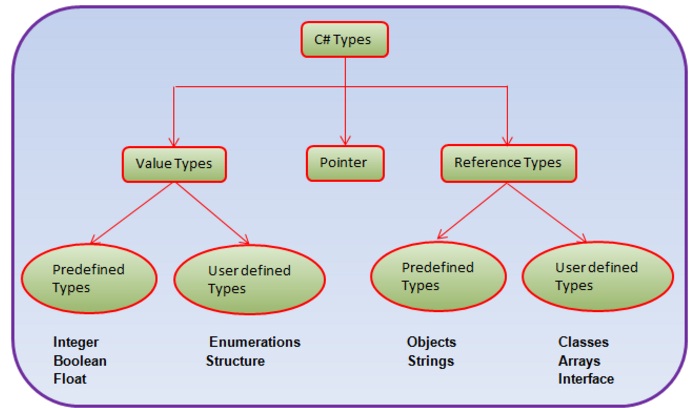
Difference between Value types and Reference types.
| Value Type | Reference Type |
|---|---|
| Stored on stack | Stored on heap |
| Contains actual value | Contains reference to a value |
| Cannot contain null values | Can contain null values |
| Value type is erased on its own from stack when control goes out of scope. | It requires garbage collector to free memory. |
| Memory is allocated at compile time | Memory is allocated at run time |
Boxing and Unboxing
Boxing and unboxing is an important concept in .NET framework. Boxing and unboxing enables you to convert value type into reference type and vice versa.Boxing: Converting a value type to reference type is called as Boxing. It is implicit conversion.
Example
int intVar = 10; // intVar is a value type
object obj = intVar; // intVar is boxed
System.Console.WriteLine(intVar.ToString());
Unboxing: Converting a reference type into value type is called unboxing. It is an explicit operation.
Example
using System.Collections;
ArrayList list = new ArrayList(); // list is a reference type
int intVar = 10; // intVar is a value type
list.Add(intVar); // intVar is boxed
intVar = (int)list[0]; // list[0] is unboxed
System.Console.WriteLine(intVar.ToString());
Nullable Types
nullable types is a special types in C#, in which you can assign normal values as well as null values. nullable types comes under the value types. A nullable type has the same range and characteristics as its fundamental or built in type.Nullable types are instances of the System.Nullable<T> struct>, where T must be a non nullable value type.
You can create nullable types in two different ways. First, you can explicitly declare
objects of type Nullable<T.
Example:
System.Nullable<int> intVar;
System.Nullable<bool> flag;
It will creates int and bool nullable types.
Second way, which is also sweet and short, is given below. You can create a value type as nullable by using the ? symbol after the value type.
int ? count;
bool ? done;
int ? x = null.
There are many scenarios in real life where nullable types are very important. Suppose that there is a column in database table of type integer and the value in database is null. If we want to use this database value or assign to other variable in C#, previously there was no way but now we can use nullable types.
Properties
HasValue: It indicates whether variable has value of its underlying type. If it has value then it returns true otherwise false.Value: Gets the value of the current nullable type variable.
Methods
GetValueOrDefault(): Retrieves the value of the current Nullable<T> object, or the object's default value.HasValue property returns true if the nullable type variable has been assigned a value; otherwise it will return false.
Accessing the value using intVar.Value (NullableType.value) will throw a runtime exception if we assign null or not assigned any value.
static void Main(string[ ] args)
{
int ? intVar = null;
Console.WriteLine("intVar has value: " + intVar.Value);
}
The above code will give runtime exception.
Example
using System;
namespace ConsoleApplication1
{
class Program
{
static void Main(string[ ] args)
{
int? intVar = null;
if (intVar.HasValue)
Console.WriteLine("intVar has value: " + intVar.Value);
else
{
Console.WriteLine("intVar has no value");
Console.WriteLine("intVar = "+intVar.GetValueOrDefault());
}
intVar = 35;
if (intVar.HasValue)
Console.WriteLine("intVar has value: " + intVar.Value);
else
Console.WriteLine("intVar has no value");
Console.ReadLine();
}
}
}
Output:
intVar has no value
intVar =0
intVar has value = 35
NOTE: Nested nullable types are not allowed. Nullable<Nullable<int>> intVar. It will give a compile time error.
Static Nullable helper class
Comparison operators do not work against null. Let us take example.Example
using System;
namespace ConsoleApplication1
{
class Program
{
static void Main(string[] args)
{
int? firstVar = null;
int secondVar = 100;
if (firstVar < secondVar)
Console.WriteLine("intVar < secondVar");
else if (firstVar > 100)
Console.WriteLine("intVar > secondVar");
else if (firstVar == 100)
Console.WriteLine("intVar == secondVar");
else
Console.WriteLine("Could not compare null");
Console.ReadLine();
}
}
}
Output:
Could not compare null
Nullable static class has a compare() method to compare nullable types.
Example
using System;
namespace ConsoleApplication1
{
class Program
{
static void Main(string[] args)
{
int? firstVar = null;
int secondVar = 100;
if (Nullable.Compare<int>(firstVar, secondVar) < 0)
Console.WriteLine("firstVar < secondVar");
else if (Nullable.Compare<int>(firstVar, secondVar) > 0)
Console.WriteLine("firstVar > secondVar");
else
Console.WriteLine("firstVar = secondVar");
Console.ReadLine();
}
}
}
Output:
firstVar < secondVar