Style Sheet Rules
- A CSS consists of selector and declaration block.
- Rule = selector + declaration.
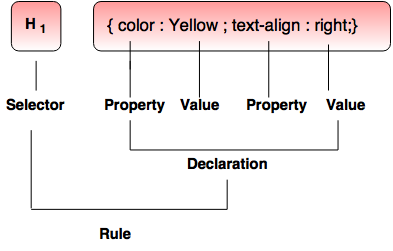
Property
- It is assigned to selector for manipulating its style.
- Example of Property- background, border, text-align.
- It is assigned to set a property.
- In the diagram above, the property color value is set to yellow.
- It defines property and value for selector.
- For example - color : yellow.
- It is the name of an HTML element.
- It is applicable to a declaration.
Types of Selectors
1. The Element / Tag selectorIt is used to define tags associated with HTML.
Syntax:
TagSelector {Property : Value; }
Examples:
- H1 {color : pink;}
- H1, p {font-family : times roman;}
It is used to define styles without redefining plain HTML tags.
Syntax:
.ClassSelector {Property : Value;}
Example: Demonstration of class selector
<!DOCTYPE html>
<html>
<head>
<style>
.greet
{
color:red;
text-align: left;
}
</style>
</head>
<body>
<H1 class= "greet"> WELCOME!!!</h1>
</body>
</html>
Output:

3. ID selectors
ID selector is used to define styles relating to objects with a unique ID.
Syntax:
#IDSelector {Property : value;}
Example: Illustration of id-selector
<!DOCTYPE html>
<html>
<head>
<style>
#greet {
color:purple;
font-family : arial;
}
</style>
</head>
<body>
<div id= "greet"> WELCOME!!!</div>
<p> Welcome Students!</p>
<div id="greet"> <p> We will learn CSS</p></div>
</body>
</html>
Output:

4. Grouped Selectors
- If there are elements with the same style definitions, then it is easy for the group selector to minimize the code.
- Group selectors are specified with comma (,) in between their names.
Selector1, selector 2, ….{property : value;}
Example: Illustration of grouped selector
<!DOCTYPE html>
<html>
<head>
<style>
h1, p {color : red;}
</style>
</head>
<body>
<h1> Welcome </h1>
<p> welcome Students </p>
</body>
</html>
Output:

Note: In the above program, same declaration is applied for both <h1> and <p> tags.
5. Context Selectors
Example: Demonstration of context selector
<!DOCTYPE html>
<html>
<head>
<style>
b i {color : red;}
</style>
</head>
<body>
<b><i> Welcome </i></b>
<b> welcome Students </b>
</body>
</html>
Output:

6. CSS comments
- Comments are denoted within a style sheet like in C programming.
- They do not work in the HTML code.
Example: Demonstration of comments
<!DOCTYPE html>
<html>
<head>
<style>
b i {color : red;}// This will work for line 1 not for line 2
</style>
</head>
<body>
<b><i> Welcome </i></b> //line 1
<b> welcome Students </b> // line 2
</body>
</html>
Output:

Note: Comments work only in the CSS code whereas in HTML code they do not work.