- This property defines the white space around an HTML border element.
- A border must be added to each element to get the result of the margin attribute.
- margin: 5px; - It gives margin of 5px to each side such as top,right, bottom, left.
- margin: 0px; - No margin
- margin: 2; - Creates a uniform margin on all sides.
- margin: 2%; - Creates a margin of 2% on every side.
- margin: auto; - It aligns the element horizontally in the center of the container.
- margin-right: 4px; - It creates only right border.
- margin : 4px 10px; - It creates right and left border by default.
- margin : 3px 6px 10px 14px; - It creates all the borders.
- margin-left: inherit; - It creates the margin that is inherited from the parent element.
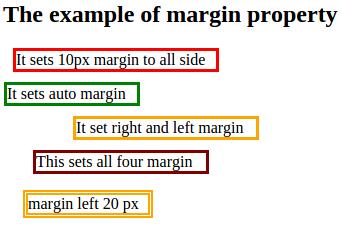
Example: Demonstration of margin property
<html>
<head>
<title>Extenal style sheet</title>
<style type="text/css">
.ma{
border-width: 3px;
border-style: solid;
border-color:red;
margin: 10px;
width:200px;
}
.ma1{
border-width: 3px;
border-style: solid;
border-color:green;
margin: 1px;
width:130px;
}
.ma2{
border-width: 3px;
border-style: solid;
border-color:orange;
margin: 10px 70px;
width:180px;
}
.ma3{
border-width: 3px;
border-style: solid;
border-color: maroon;
margin: 4px 10px;
margin: 3px 6px 10px 30px;
width:170px;
}
.ma4{
margin-left: 20px;
border: 5px double orange;
width:120px;
}
</style>
</head>
<body>
<p> <h2>The example of margin property</h2></p>
<p class="ma"> It sets 10px margin to all side</p>
<p class="ma1"> It sets auto margin</p>
<p class="ma2">It set right and left margin</p>
<p class="ma3"> This sets all four margin</p>
<p class="ma4">margin left 20 px</p>
</body>
</html>
Output: