CSS supports the following text formatting properties:
1. letter-spacing
This property sets the space between characters.The value for letter spacing:
- letter-spacing: 5px – Sets the spacing between letter of 5px.
- letter-spacing: -5px – Sets the spacing between letter of -5px.
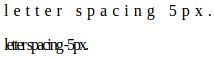
Example: Demonstration of letter spacing
<html>
<body>
<p style="letter-spacing: 5px;">letter spacing 5px.</p>
<p style="letter-spacing: -2px;">letter spacing -5px.</p>
</body>
</html>
Output:
2. Word-spacing
This property sets the space between words.The values for word spacing can be:
- word-spacing: 4px – Sets the spacing between word of 4px.
- word-spacing: -4px – Sets the spacing between word of -4px.
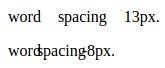
Example: Demonstration of word-spacing
<html>
<body>
<p style="word-spacing: 13px;">word spacing 13px.</p>
<p style="word-spacing: -8px;">word spacing -8px.</p>
</body>
</html>
Output:
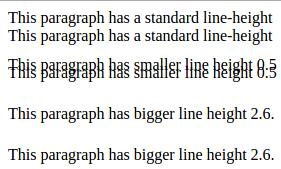
3. Line-height
This property is used to specify the space between two lines.The values for the property can be:
- Normal
- Numbers like 0.5, 1.3, 2 etc.
- Length like 22 px, etc.
- Percentage like 150%, etc.
Example: Demonstration of Line-height
<html>
<head>
<style>
p.small
{
line-height: 0.5;
}
p.big
{
line-height: 1.3;
}
</style>
</head>
<body>
<p> This paragraph has a standard line-height</p>
<p class="big"> This paragraph has bigger line height 1.3.</p>
<p class="small"> This paragraph has smaller line height 0.5</p>
</body>
</html>
Output:
4. Text-decoration
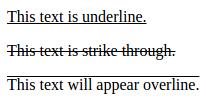
This property is used to set or remove decorations from text.The possible values for this property are:
- none (default value)
- underline
- overline
- line-through
- blink
Example: Demonstration of text-decoration
<html>
<body>
<p style="text-decoration:underline;">
This text is underline.
</p>
<p style="text-decoration:line-through;">
This text is strike through.
</p>
<p style="text-decoration:overline;">
This text will appear overline.
</p>
</body>
</html>
Output:
5. Text-transform
This property is used to specify the text into uppercase, lowercase and capitalize the first letter of the word.The possible values for text-transform property are:
- none
- capitalize
- uppercase
- lowercase
Example: Demonstration of text-transform
<html>
<body>
<p style="text-transform:capitalize;">
This text will be capitalized.
</p>
<p style="text-transform:uppercase;">
This text will be in uppercase.
</p>
<p style="text-transform:lowercase;">
This text will be in lowercase.
</p>
</body>
</html>
Output:
This Text Will Be Capitalized.
THIS TEXT WILL BE IN UPPERCASE.
this text will be in lowercase.
6. Text-align
The possible values for text align property are:- left
- right
- center
- justify
7. Text-indent
This property is used to specify the indentation of the first line of the text of a block level element.The possible value for text-indent are:
- length like 1.7px, 50px, 1 cm etc.
- percentage like 10% , 25 %, etc.
Example: Illustration of text-indent
<html>
<body>
<p style="text-indent: 50px;">
This is the first line indented by 50px. <br> This line will remain at its actual position.
</p>
</body>
</html>
Output:

8. White-space
The white-space property is used to control the flow and formatting of the text.The possible values for white-space are:
- normal
- pre