1. section – It is used for representing a generic document or application section. This tag can be used together with h1-h6 for indicating the document structure.
2. article – It is used for representing an independent piece of content of a document such as a blog entry or newspaper article.
3. aside – This tag is used for representing a piece of content that is only slightly related to the rest of the page.
4. header – This tag represents the header of a section.
5. footer – This tag helps in representing a footer of a section which may contain information regarding the author, copyright information, etc.
6. nav – It is used for representing the section of a document that is intended for navigation.
7. dialog – It is used to mark up a conversation.
8. figure - This tag is used for associating a caption together with some embedded content such as a graphic or a video.
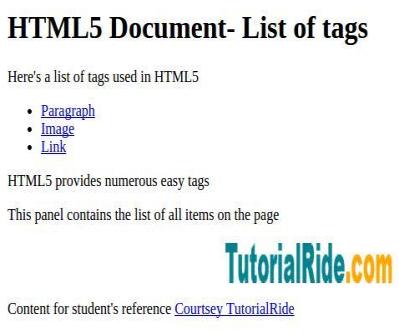
Example : Demonstrating the HTML5 structure of a simple program
<!DOCTYPE html>
<html>
<head>
<meta charset="utf-8">
<title>Example</title>
</head>
<body>
<header role="banner">
<h1>HTML5 Document - List of tags</h1>
<p>Here's a list of tags used in HTML5</p>
</header>
<nav>
<ul>
<li><a href="#">Paragraph</a></li>
<li><a href="#">Image</a></li>
<li><a href="#">Link</a></li>
</ul>
</nav>
<article>
<section>
<p>HTML5 provides numerous easy tags</p>
</section>
</article>
<aside>
<p>This panel contains the list of all items on the page</p>
</aside>
<figure align="center">
<img src="logo.png" alt="TutorialRide" width="200" height="40">
</figure>
<footer>
<p>Content for student's reference <a href="#">Courtsey TutorialRide</a></p>
</footer>
</body>
</html>
Output: