Answer:
The FileInputStream is used for reading streams of raw bytes and FileOutputStream is used to write the data on file. The write () method is used to write the data on a text file.
In this example, we read the data from a file and then copy it on another file. First specify the name of the source file and destination file.
CopyFile.java
import java.io.*;
class CopyFile
{
public static void main(String[] args) throws IOException
{
int i;
FileInputStream fin;
FileOutputStream fout;
try
{
fin = new FileInputStream(args[0]);
}
catch (FileNotFoundException fnfe)
{
fnfe.printStackTrace();
return;
}
try
{
fout = new FileOutputStream (args[1]);
}
catch (FileNotFoundException fofe)
{
fofe.printStackTrace();
return;
}
catch (ArrayIndexOutOfBoundsException ai)
{
ai.printStackTrace();
return;
}
try
{
do
{
i = fin.read ();
if (i != -1)
{
fout.write(i);
}
}
while (i != -1);
}
catch (IOException ioe)
{
ioe.printStackTrace();
}
fin.close();
fout.close();
}
}
Output:
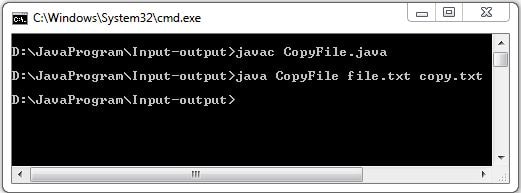
First, compile the file java file. Then use the below command to copy the data from "file.txt" to "copy.txt". The file.txt is the source file and copy.txt is the destination file.