1. Form Object
- Form object represents an HTML form.
- It is used to collect user input through elements like text fields, check box and radio button, select option, text area, submit buttons and etc.
<form> . . . </form>
Form Object Properties
| Property | Description |
|---|---|
| Action | It sets and returns the value of the action attribute in a form. |
| enctype | It sets and returns the value of the enctype attribute in a form. |
| Length | It returns the number of elements in a form. |
| Method | It sets and returns the value of the method attribute in a form that is GET or POST. |
| Name | It sets and returns the value of the name attribute in a form. |
| Target | It sets and returns the value of the target attribute in a form. |
Form Object Methods
| Method | Description |
|---|---|
| reset() | It resets a form. |
| submit() | It submits a form. |
2. Hidden Object
- Hidden object represents a hidden input field in an HTML form and it is invisible to the user.
- This object can be placed anywhere on the web page.
- It is used to send hidden form of data to a server.
<input type= “hidden”>
Hidden Object Properties
| Property | Description |
|---|---|
| Name | It sets and returns the value of the name attribute of the hidden input field. |
| Type | It returns type of a form element. |
| Value | It sets or returns the value of the value attribute of the hidden input field. |
3. Password Object
- Password object represents a single-line password field in an HTML form.
- The content of a password field will be masked – appears as spots or asterisks in the browser using password object.
<input type= “password”>
Password Object Properties
| Property | Description |
|---|---|
| defaultValue | It sets or returns the default value of a password field. |
| maxLength | It sets or returns the maximum number of characters allowed in a password filed. |
| Name | It sets or returns the value of the name attribute of a password field. |
| readOnly | It sets or returns whether a password fields is read only or not. |
| Size | It sets or returns the width of a password field. |
| Value | It sets or returns the value of the attribute of the password field. |
Password Object Methods
| Method | Description |
|---|---|
| select() | It selects the content of a password field. |
4. Checkbox Object
- Check box object represents a checkbox in an HTML form.
- It allows the user to select one or more options from the available choices.
<input type= “checkbox”>
Checkbox Object Properties
| Property | Description |
|---|---|
| Name | It sets or returns the name of the checkbox. |
| Type | It returns the value “check”. |
| Value | It sets or returns the value of the attribute of a checkbox. |
| checked | It sets or returns the checked state of a checkbox. |
| defaultChecked | It returns the default value of the checked attribute. |
Checkbox Object Methods
| Method | Description |
|---|---|
| click() | It sets the checked property. |
5. Select Object
- Select object represents a dropdown list in an HTML form.
- It allows the user to select one or more options from the available choices.
<select> … </select>
Select Object Collections
| Collection | Description |
|---|---|
| options | It returns a collection of all the options in a dropdown list. |
Select Object Properties
| Property | Description |
|---|---|
| Length | It returns the number of options in a dropdown list. |
| selectedIndex | It sets or returns the index of the selected option in a dropdown list. |
| Type | It returns a type of form element. |
| name | It returns the name of the selection list. |
Select Object Methods
| Method | Description |
|---|---|
| add() | It adds an option to a dropdown list. |
| remove() | It removes an option from a dropdown list. |
6. Option Object
- Option object represents an HTML <option> element.
- It is used to add items to a select element.
<option value> . . . </option>
Option Object Properties
| Property | Description |
|---|---|
| Index | It sets or returns the index position of an option in a dropdown list. |
| Text | It sets or returns the text of an option element. |
| defaultSelected | It determines whether the option is selected by default. |
| Value | It sets or returns the value to the server if the option was selected. |
| Prototype | It is used to create additional properties. |
Option Object Methods
| Methods | Description |
|---|---|
| blur() | It removes the focus from the option. |
| focus() | It gives the focus to the option. |
Example : Simple Program on Option Object Method
<html>
<head>
<script type="text/javascript">
function optionfruit(select)
{
var a = select.selectedIndex;
var fav = select.options[a].value;
if(a==0)
{
alert("Please select a fruit");
}
else
{
document.write("Your Favorite Fruit is <b>"+fav+".</b>");
}
}
</script>
</head>
<body>
<form>
List of Fruits:
<select name="fruit">
<option value="0">Select a Fruit</option>
<option value="Mango">Mango</option>
<option value="Apple">Apple</option>
<option value="Banana">Banana</option>
<option value="Strawberry">Strawberry</option>
<option value="Orange">Orange</option>
</select>
<input type="button" value="Select" onClick="optionfruit(this.form.fruit);">
</form>
</body>
</html>
Output:
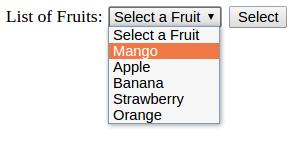
Your Favorite Fruit is Mango.
7. Radio Object
Radio object represents a radio button in an HTML form.Syntax:
<input type= “radio”>
Radio Object Properties
| Property | Description |
|---|---|
| Checked | It sets or returns the checked state of a radio button. |
| defaultChecked | Returns the default value of the checked attribute. |
| Name | It sets or returns the value of the name attribute of a radio button. |
| Type | It returns the type of element which is radio button. |
| Value | It sets or returns the value of the radio button. |
Radio Object Methods
| Method | Description |
|---|---|
| blur() | It takes the focus away from the radio button. |
| click() | It acts as if the user clicked the button. |
| focus() | It gives the focus to the radio button. |
8. Text Object
Text object represents a single-line text input field in an HTML form.Syntax:
<input type= “text”>
Text Object Properties
| Property | Description |
|---|---|
| Value | It sets or returns the value of the text field. |
| defaultValue | It sets or returns the default value of a text field. |
| Name | It sets or returns the value of the name attribute of a text field. |
| maxLength | It sets or returns the maximum number of characters allowed in a text field. |
| readOnly | It sets or returns whether a text field is read-only or not. |
| Size | It sets or returns the width of a text field. |
| Type | It returns type of form element of a text field. |
9. Textarea Object
Textarea object represents a text-area in an HTML form.Syntax:
<textarea> . . . </textarea>
Textarea Object Properties
| Property | Description |
|---|---|
| Value | It sets or returns the value of the text field. |
| defaultValue | It sets or returns the default value of a text field. |
| Name | It sets or returns the value of the name attribute of a text field. |
| Type | It returns type of form element of a text field. |
| Rows | It displays the number of rows in a text area. |
| Cols | It displays the number of columns in a text area. |