Selectors : Selecting Elements with jQuery
- They are used to manipulate HTML elements as a group or a single element.
- Selectors get the exact element/attribute from the HTML document.
- The selectors always start with a dollar sign and parentheses: $().
- It is also called as a factory function.
| Building blocks of $() | Description |
|---|---|
| Tag Name | Represents a tag name available in DOM. Example: $('p') will select all the paragraphs in the document. |
| Tag ID | Represents a tag ID available in DOM. Example: $('#my-id') will select the single element in the document that has an ID of my-id. |
| Tag Class | Represents a tag class available in DOM. Example: $('.my-class') will select all the elements in the html document that has a class of my-class. |
| Universal | Selects all elements available in DOM. |
| Multiple Elements A,B,C | Selects all the combined results of all the specified selectors A,B,C. |
Example : Demonstrating the use of selector tags
<html>
<head>
<title> The Example </title>
<script type="text/javascript" src="https://ajax.googleapis.com/ajax/libs/jquery/1.12.2/jquery.min.js"> </script>
<script type="text/javascript" language ="javascript">
$(document).ready(function()
{
var para =$("p"); //tag name
for(i=0; i<para.length; i++)
{
alert("Paragraph No: " +para[i].innerHTML);
}
});
</script>
</head>
<body>
<div>
<p class="myclass">First Para. </p><!--tag class-->
<p id="myid">Second Para </p> <!--tag id-->
<p> Third Para. </p> <!--tag name-->
</div>
</body>
</html>
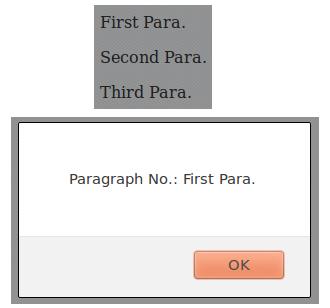
Output:
By clicking on the 'OK' button you will get the next screen.
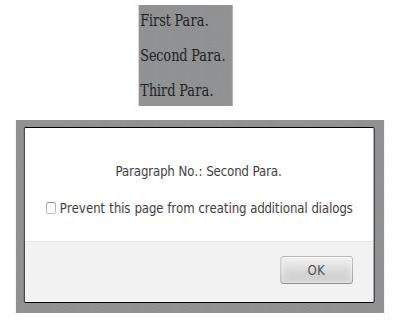
The following screen appears when the OK button is clicked and if we select the “Prevent this page from creating additional dialogs” the alert box will not appear.
Various types of Selectors
| Types | Description |
|---|---|
| $(“*”) | Selects all elements. |
| $(“p”) | Selects all the <p> paragraph elements. |
| $(“p>*”) | Selects all the elements that are children of <p> element. |
| $(“.myclass”) | Selects all elements with class= “myclass”. |
| $(“p.myclass”) | Selects all paragraph <p> elements with class= “myclass”. |
| $(“p:not(.myclass)”) | Selects all the <p> elements that do not have a class= “myclass”. |
| $(“p#myID.myclass”) | This selector matches the paragraphs with an id of myID and a class of myClass. |
| $(“:empty”) | Selects all the elements that have no children. |
| $(“p:empty”) | Selects all <p> elements that have no children. |
| $(“:animated”) | Selects all the elements that are animated currently. |
| $(“:button”) | Selects all <button> and <input> elements of type=“button”. |
| $(“:even”) | Selects all the even elements. |
| $(“li:even”) | Selects all <li> elements that have an even index value. |
| $(“:odd”) | Selects all the odd elements. |
| $(“p:visible”) | Selects all the <p> elements that are visible. |
| $(“p:hidden”) | Selects all the <p> elements that are hidden. |
| $(this) | Selects the current HTML element. |
| $(“div[p]”) | Selects all the elements matched by <div> that contain an element matched by <p>. |
| $(“p:first”) | Selects the first <p> element. |
| $(“p#myID:first”) | Selects the first <p> element with id= “myID”. |
| $(“#myID”) | Selects the first element with id= “myID”. |
| $(“ul li:first-child”) | Selects the first <li> element of every <ul>. |
| $(“[href]”) | Selects all the elements with the href attribute. |
| $(“a[@rel]”) | Selects all the elements matched by <a> that have a 'rel' attribute. |
| $(“input[@name=txtname]”) | Selects all the elements matched by the <input> tag that have a name value exactly equal to the txtname. |
| $(“input[@name^=txt]”) | Selects all the elements matched by the <input> tag that have a name value beginning with txt. |
| $(“[href='abc.asp]”) | Selects all elements with an href value equal to “abc.asp”. |
| $(“[href!='abc.asp]”) | Selects all elements with an href value NOT equal to “abc.asp”. |
| $(“div#myID.head”) | Selects all elements with class = “head” inside a <div> element with id = “myID”. |