Answer:
When we need to refresh the web page automatically after some time, we use JSP setIntHeader() method. This method sends back header "Refresh" to the browser along with an integer value which indicates time interval in seconds. It is used when we need to display live game score, share market status etc.
Below example shows how to use setIntHeader() method to set Refresh header to simulate a digital clock.
auto-refresh.jsp
<%@ page import="java.io.*,java.util.*" %>
<html>
<head>
<title>Auto Refresh</title>
</head>
<body>
<center>
<form>
<fieldset style="width:20%; background-color:#e6ffe6;">
<legend>Auto refresh</legend>
<h2>Auto Refresh Example</h2>
<%
// Set refresh, autoload time as 1 seconds
response.setIntHeader("Refresh", 1);
// Get current time
Calendar calendar = new GregorianCalendar();
String am_pm;
int hour = calendar.get(Calendar.HOUR);
int minute = calendar.get(Calendar.MINUTE);
int second = calendar.get(Calendar.SECOND);
if(calendar.get(Calendar.AM_PM) == 0)
am_pm = "AM";
else
am_pm = "PM";
String CT = hour+":"+ minute +":"+ second +" "+ am_pm;
out.println("Crrent Time: " + CT + "\n");
%>
</fieldset>
</form>
</center>
</body>
</html>
web.xml
<web-app>
<servlet>
<servlet-name>xyz</servlet-name>
<jsp-file>/auto-refresh.jsp</jsp-file>
</servlet>
<servlet-mapping>
<servlet-name>xyz</servlet-name>
<url-pattern>/test</url-pattern>
</servlet-mapping>
</web-app>
Output:
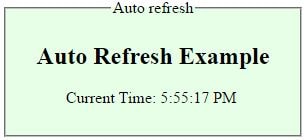
It refreshes the browser every second and current time will be changed automatically.