Answer:
Information which is stored on the client machine is called cookies. It has parameters like name, value, path, host, expires and connection type.
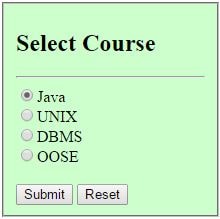
In this example, when we click on submit button after checking the value, the cookies add selected value.
index.html
<!doctype html>
<head>
<title>CookiesExample</title>
</head>
<body>
<form method='post' action='servlet/cookies'>
<fieldset style="width:14%; background-color:#ccffcc">
<h2>Select Course</h2> <hr>
<input type='radio' name='course' value='Java'>Java<br>
<input type='radio' name='course' value='UNIX'>UNIX<br>
<input type='radio' name='course' value='MCA'>DBMS<br>
<input type='radio' name='course' value='OOSE '>OOSE<br><br>
<input type='submit'> <input type='reset'><br>
</fieldset>
</form>
</body>
</html>
AddCookie.java
import java.io.*;
import javax.servlet.*;
import javax.servlet.http.*;
public class AddCookie extends HttpServlet
{
public void doPost(HttpServletRequest req, HttpServletResponse res) throws ServletException,IOException
{
res.setContentType("text/html");
PrintWriter pw = res.getWriter();
Cookie []c = req.getCookies();
int id=1;
if(c!=null) id = c.length+1;
String value = req.getParameter("course");
Cookie newCookie = new Cookie("course:"+id,value);
res.addCookie(newCookie);
pw.println("<h4>Cookie added with value "+value+"</h4>");
}
}
web.xml
<web-app>
<servlet>
<servlet-name>AddCookie</servlet-name>
<servlet-class>AddCookie</servlet-class>
</servlet>
<servlet-mapping>
<servlet-name>AddCookie</servlet-name>
<url-pattern>/servlet/cookies</url-pattern>
</servlet-mapping>
<welcome-file-list>
<welcome-file>index.html</welcome-file>
</welcome-file-list>
</web-app>
Output:
Select Java and click on submit. It adds the cookies with value Java.