Answer:
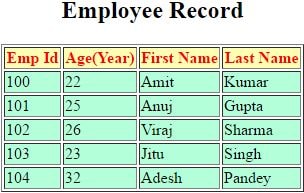
The communication between servlet program to database is same as the JDBC connection. In this example we fetch the record from the database and display it on the browser.
SelectDB.java
import java.io.*;
import java.util.*;
import javax.servlet.*;
import javax.servlet.http.*;
import java.sql.*;
public class SelectDB extends HttpServlet
{
public void doGet(HttpServletRequest request, HttpServletResponse response) throws ServletException, IOException
{
Statement stmt=null;
ResultSet rs=null;
Connection conn= null;
// Set response content type
response.setContentType("text/html");
PrintWriter out = response.getWriter();
String title = "Database Result";
String docType =
"<!doctype html" +
"transitional//en\">\n";
out.println(docType +
"<html>\n" +
"<head><title>" + title + "</title></head>\n" +
"<body>");
try
{
// Register JDBC driver
Class.forName("oracle.jdbc.driver.OracleDriver");
// Open a connection
conn = DriverManager.getConnection("jdbc:oracle:thin:@localhost:1521:xe", "local", "test");
// Execute SQL query
stmt = conn.createStatement();
String sql;
sql = "SELECT * FROM Employees";
rs = stmt.executeQuery(sql);
out.println("<table border=1 >");
out.println("<caption><h2>Employee Record</h2></caption>");
out.println("<tr style='background-color:#ffffb3; color:red'>");
out.println("<th>Emp Id</th>");
out.println("<th> Age(Year)</th>");
out.println("<th>First Name</th>");
out.println("<th>Last Name</th>");
out.println("</tr>");
// Extract data from result set
while(rs.next())
{
//Retrieve by column name
int id = rs.getInt("id");
int age = rs.getInt("age");
String first = rs.getString("first");
String last = rs.getString("last");
//Display values
out.println("<tr style='background-color:#b3ffd9;'>");
out.println("<td>" + id + "</td>");
out.println("<td>" + age + "</td>");
out.println("<td>" + first + "</td>");
out.println("<td>" + last + "</td>");
out.println("</tr>");
}
out.println("</table>");
out.println("</bod;=y></html>");
// Clean-up environment
rs.close();
stmt.close();
conn.close();
}
catch(SQLException se)
{
se.printStackTrace();
}
catch(Exception e)
{
e.printStackTrace();
}
finally
{
//finally block used to close resources
try
{
if(stmt!=null)
stmt.close();
}
catch(SQLException se2)
{}// nothing we can do
try
{
if(conn!=null)
conn.close();
}
catch(SQLException se)
{
se.printStackTrace();
}
}
}
}
web.xml
<web-app>
<servlet>
<servlet-name>abc</servlet-name>
<servlet-class>SelectDB</servlet-class>
</servlet>
<servlet-mapping>
<servlet-name>abc</servlet-name>
<url-pattern>/test</url-pattern>
</servlet-mapping>
</web-app>
Output: